Empowering HR API
Connect your systems to Empowering HR case management. Automate case creation, read case data, and integrate HR workflows into your own applications.
Base URL
All API requests are made against one of the environments below. Use UAT for development and testing, then switch to production when you're ready to go live.
| Environment | API Base URL | Auth Server |
|---|---|---|
| UAT | https://api.uat.empoweringhr.com | https://auth.uat.empoweringhr.com |
| Production | https://api.empoweringhr.com | https://auth.empoweringhr.com |
All requests must use HTTPS. Plaintext HTTP requests are rejected.
Get the ClientAdmin role
Before you can generate API credentials, you need the ClientAdmin role assigned to your account. This role grants access to the API Credentials section in the admin portal.
How to request
-
Submit a ticket
Go to the AdviserPlus support portal and raise a request for the ClientAdmin role to be assigned to your account.
-
Wait for confirmation
Once the role has been assigned, you'll be able to see the API Credentials tab in the admin portal.
-
Generate credentials
Follow the steps in the next section to create your first API credential.
Generate API credentials
API credentials are managed through the admin portal. Each credential is a client ID and secret pair that your systems use to authenticate against the Empowering HR API.
View existing credentials
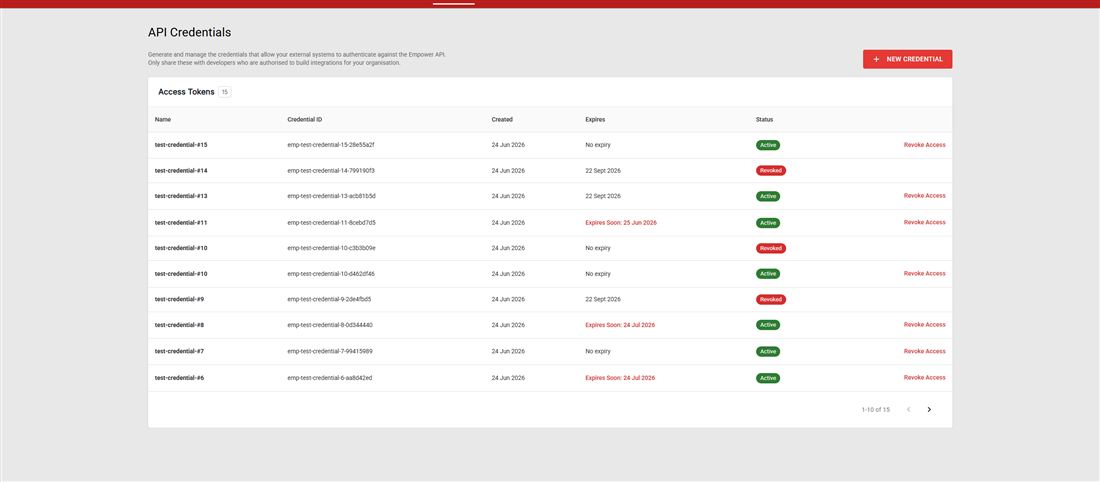
Navigate to the admin portal and select the API Credentials tab. You'll see all credentials for your organisation with their name, client ID, creation date, expiry, and status.
Create a new credential
-
Open the creation dialog
Click the + New Credential button in the top right corner.
-
Enter a name and expiry
Give the credential a descriptive name that identifies the system or integration it belongs to — for example, Payroll Integration or HR Dashboard. Choose an expiry period from the dropdown, or leave it without an expiry if the integration should run indefinitely.
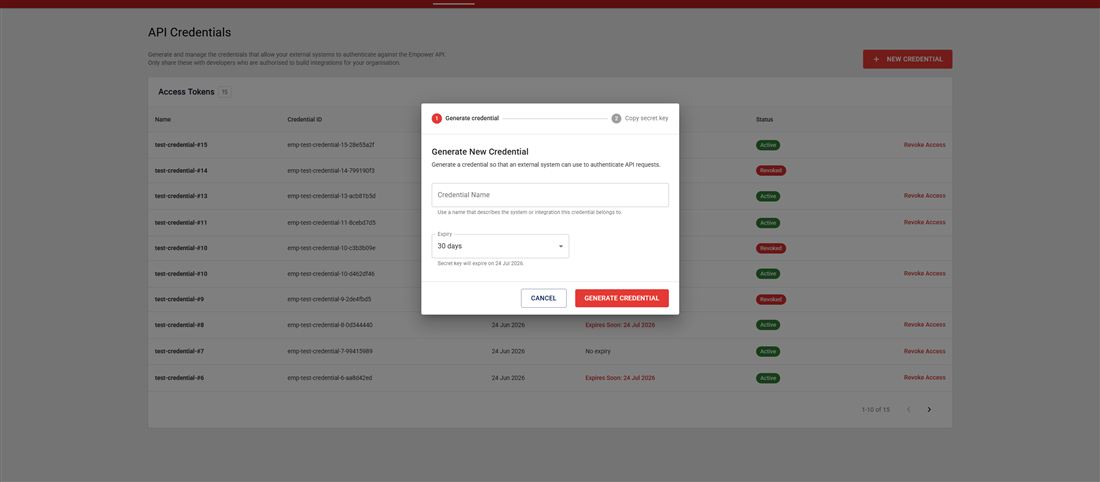 Enter a name that describes the system this credential is for. The expiry dropdown controls when the secret key will stop working.
-
Save the secret key immediately
After clicking Generate Credential, you'll see your new Credential ID and Secret Key. Copy both values and store them securely.
The secret key is shown only once. It cannot be retrieved after you close this dialog. If you lose it, you'll need to revoke the credential and create a new one.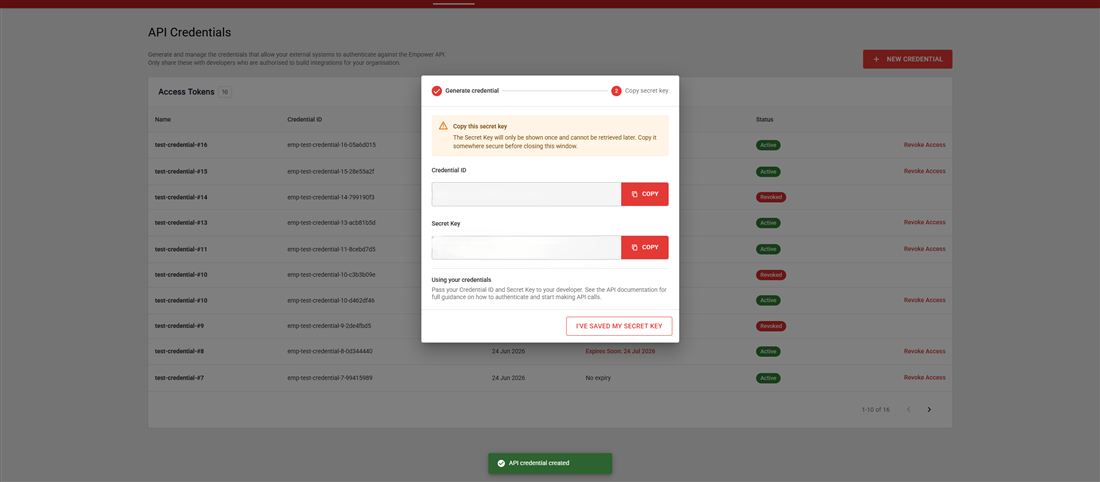 Copy both the Credential ID and Secret Key using the copy buttons. Pass these to your developer to configure the integration.
Click I've saved my secret key when you've stored the values securely. These are the
client_idandclient_secretyou'll use in the authentication step below.
Revoke a credential
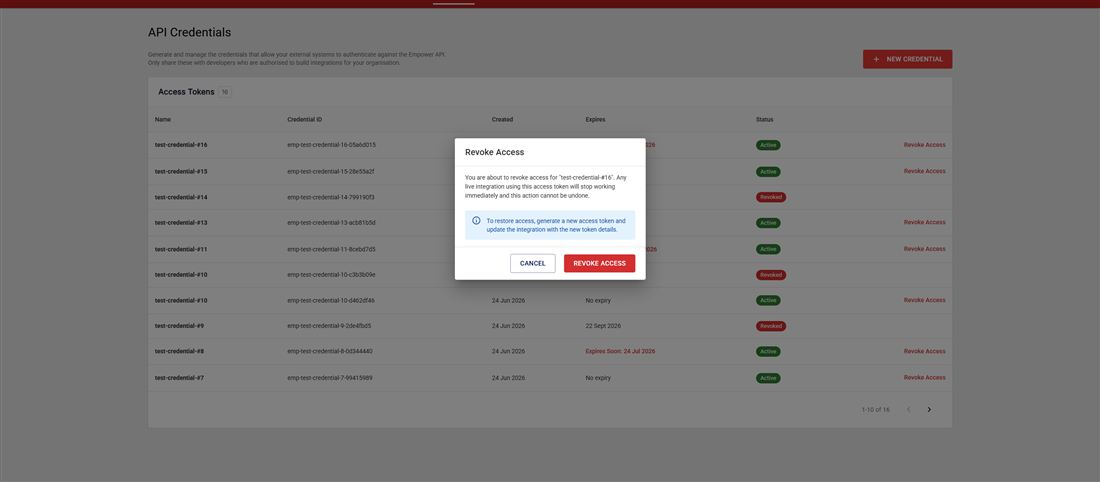
If a credential is compromised or no longer needed, revoke it from the credentials list by clicking Revoke Access next to the credential.
Authenticate
The API uses OAuth 2.0 Client Credentials to authenticate machine-to-machine requests. You exchange your client ID and secret for a short-lived access token, then pass that token in every API request.
How it works
-
Request a token
Send your credentials to the token endpoint. You'll receive a JWT access token.
-
Call the API
Include the token in the
Authorizationheader of every request. -
Refresh when expired
Tokens expire after 1 hour. Request a new one before or when you receive a
401response.
Request an access token
Make a POST request to the identity server's token endpoint with your credentials.
Request
curl -X POST https://auth.empoweringhr.com/connect/token \
  -H "Content-Type: application/x-www-form-urlencoded" \
  -d "grant_type=client_credentials&\
client_id=YOUR_CLIENT_ID&\
client_secret=YOUR_CLIENT_SECRET&\
scope=processengineapiaccess"
using var httpClient = new HttpClient();
var response = await httpClient.PostAsync(
"https://auth.empoweringhr.com/connect/token",
new FormUrlEncodedContent(new Dictionary<string, string>
{
["grant_type"] = "client_credentials",
["client_id"] = "YOUR_CLIENT_ID",
["client_secret"] = "YOUR_CLIENT_SECRET",
["scope"] = "processengineapiaccess"
}));
var json = await response.Content.ReadFromJsonAsync<JsonElement>();
var accessToken = json.GetProperty("access_token").GetString();import requests
response = requests.post(
"https://auth.empoweringhr.com/connect/token",
data={
"grant_type": "client_credentials",
"client_id": "YOUR_CLIENT_ID",
"client_secret": "YOUR_CLIENT_SECRET",
"scope": "processengineapiaccess",
}
)
access_token = response.json()["access_token"]Parameters
client_credentials.processengineapiaccess.Response
{
  "access_token": "eyJhbGciOiJSUzI1NiIsInR5cCI6IkpXVCJ9...",
  "token_type":   "Bearer",
  "expires_in":  3600,
  "scope":       "processengineapiaccess"
}| Field | Description |
|---|---|
access_token | A signed JWT. Include this in API requests. |
token_type | Always Bearer. |
expires_in | Token lifetime in seconds. Typically 3600 (1 hour). |
scope | The granted scope. |
Use the token
Pass the access token in the Authorization header on every API call.
GET /api/case-topics HTTP/1.1
Host: api.empoweringhr.com
Authorization: Bearer eyJhbGciOiJSUzI1NiIsInR5cCI6IkpXVCJ9...Your first API call
Once you have an access token, make your first call by retrieving the list of case topics available to your organisation. Case topics are the categories under which cases can be raised — for example, Absence, Disciplinary, or Grievance.
GET /api/case-topics
Returns the case topics enabled for your organisation.
Request
curl https://api.empoweringhr.com/api/case-topics \
  -H "Authorization: Bearer YOUR_ACCESS_TOKEN"
using var client = new HttpClient();
client.DefaultRequestHeaders.Authorization =
new AuthenticationHeaderValue("Bearer", accessToken);
var response = await client.GetAsync(
"https://api.empoweringhr.com/api/case-topics");
response.EnsureSuccessStatusCode();
var topics = await response.Content
.ReadFromJsonAsync<List<CaseTopic>>();
foreach (var topic in topics)
Console.WriteLine($"{topic.Id}: {topic.Name}");
record CaseTopic(string Id, string Name);response = requests.get(
"https://api.empoweringhr.com/api/case-topics",
headers={"Authorization": f"Bearer {access_token}"}
)
topics = response.json()
for topic in topics:
print(f"{topic['id']}: {topic['name']}")Query parameters
Response
[
  {
    "id": "3fa85f64-5717-4562-b3fc-2c963f66afa6",
    "name": "Absence"
  },
  {
    "id": "7cb2e4a1-8d3f-4b1e-9c5a-6d2f8e4b3a1c",
    "name": "Disciplinary"
  },
  {
    "id": "a1b2c3d4-e5f6-7890-abcd-ef1234567890",
    "name": "Grievance"
  }
]| Field | Type | Description |
|---|---|---|
id | string | Unique identifier for the case topic. |
name | string | Display name of the topic. |
Error responses
The API uses standard HTTP status codes and returns errors in RFC 7807 Problem Details format. Every error response includes a machine-readable status field and a human-readable detail message.
Error format
{
  "type":   "https://tools.ietf.org/html/rfc7231#section-6.5.3",
  "title":  "Forbidden",
  "status": 403,
  "detail": "Insufficient permissions."
}| Field | Type | Description |
|---|---|---|
type | string | URI reference identifying the problem type. |
title | string | Short summary of the problem. |
status | integer | HTTP status code. |
detail | string | Explanation specific to this occurrence. Use this for troubleshooting. |
HTTP status codes
Success
| Code | Meaning | When you'll see it |
|---|---|---|
| 200 | OK | Request succeeded. Response body contains the requested data. |
| 201 | Created | Resource was created. Response body contains the new resource. |
| 204 | No Content | Request succeeded. No response body. |
Client errors
| Code | Meaning | What to do |
|---|---|---|
| 400 | Bad Request | The request body is malformed or a required field is missing. Check the detail field for which parameter failed validation. |
| 401 | Unauthorized | The access token is missing, expired, or invalid. Request a new token and retry. |
| 403 | Forbidden | The token is valid but lacks the required role for this endpoint. Check that your credential has the correct permissions. |
| 404 | Not Found | The requested resource does not exist. Verify the ID or path. |
| 409 | Conflict | The request conflicts with the current state of the resource. For example, attempting to revoke an already-revoked credential. |
| 422 | Unprocessable Entity | The request body is well-formed but semantically invalid. Check the detail field for the specific validation failure. |
Server errors
| Code | Meaning | What to do |
|---|---|---|
| 500 | Internal Server Error | Something went wrong on our side. Retry with exponential backoff. If the error persists, contact Empowering HR support. |
Common authentication errors
These are the most frequent errors during integration setup. Each example shows the exact response you'll receive.
Missing token
{
  "type":   "https://tools.ietf.org/html/rfc7231#section-6.3.1",
  "title":  "Unauthorized",
  "status": 401,
  "detail": "Missing authorization token"
}
The Authorization header is absent. Add Authorization: Bearer YOUR_TOKEN to the request.
Expired token
{
  "type":   "https://tools.ietf.org/html/rfc7231#section-6.3.1",
  "title":  "Unauthorized",
  "status": 401,
  "detail": "Token has expired"
}
The token's exp claim is in the past. Request a new token from the token endpoint.
Wrong role
{
  "type":   "https://tools.ietf.org/html/rfc7231#section-6.5.3",
  "title":  "Forbidden",
  "status": 403,
  "detail": "Insufficient permissions. Required one of the following roles: ExternalMachineClient"
}
The token is valid but the client doesn't have the required role. This usually means the credential was not provisioned correctly. Contact your Empowering HR administrator.
Invalid credentials at token endpoint
If the token request itself fails (before you call the API), the identity server returns a standard OAuth 2.0 error:
{
  "error": "invalid_client"
}
The client ID or secret is wrong. Verify you're using the correct credentials for this environment.
Token lifecycle
Access tokens are short-lived by design. Handle them correctly to avoid unnecessary token requests and failed API calls.
| Property | Value |
|---|---|
| Token type | JWT (JSON Web Token), signed with RS256 |
| Lifetime | 3600 seconds (1 hour) |
| Clock skew tolerance | 5 minutes |
| Refresh tokens | Not issued. Request a new access token when the current one expires. |
Recommended pattern
Cache the token in memory and track the expiry time. Request a new token when the cached one is expired or within a short buffer of expiring.
public class TokenProvider
{
    private string? _token;
    private DateTime _expiresAt = DateTime.MinValue;
    private static readonly TimeSpan Buffer = TimeSpan.FromMinutes(2);

    public async Task<string> GetTokenAsync()
    {
        if (_token is not null && DateTime.UtcNow < _expiresAt - Buffer)
            return _token;

        // Request a new token (see authentication section)
        var response = await RequestTokenAsync();

        _token = response.AccessToken;
        _expiresAt = DateTime.UtcNow.AddSeconds(response.ExpiresIn);

        return _token;
    }
}expires_in value from the token response to manage expiry. Token claims and format may change without notice.